

It is 9:14 on a Sunday night. A mom is scrolling Facebook with a sleeping newborn on her chest, and she messages your page: “Hi, do you have any infant openings for January?” She messages two other centers on the same street while she is at it. You see her note Tuesday, between a diaper blowout and a sick-call. You reply “Yes, we do! Want to come see us?” and she never answers, because she already toured the place that replied Sunday night and put down a deposit Monday.
You did nothing wrong, you were running a center. But you lost a $13,000-a-year family to a message you could not get to in time. This post is the fix: a system that catches every message from Facebook, Instagram, and your website, replies in seconds in your voice, qualifies the family, and books the tour, without you hiring front-desk staff you cannot afford. Build it once and it runs on the nights and sick days, when the good leads come in.
What this post covers
- Why the Facebook message is the lead you are losing
- The six stages, start to booked tour
- Steal these: the messages that do the work
- Run it three ways
- The compliance part you cannot skip
- Objections I hear from directors
- Your questions, answered
Why the Facebook message is the lead you are losing
For most of my eleven years as a center director, the families who mattered did not call the office. They messaged the Facebook page at night, after the kids were down.
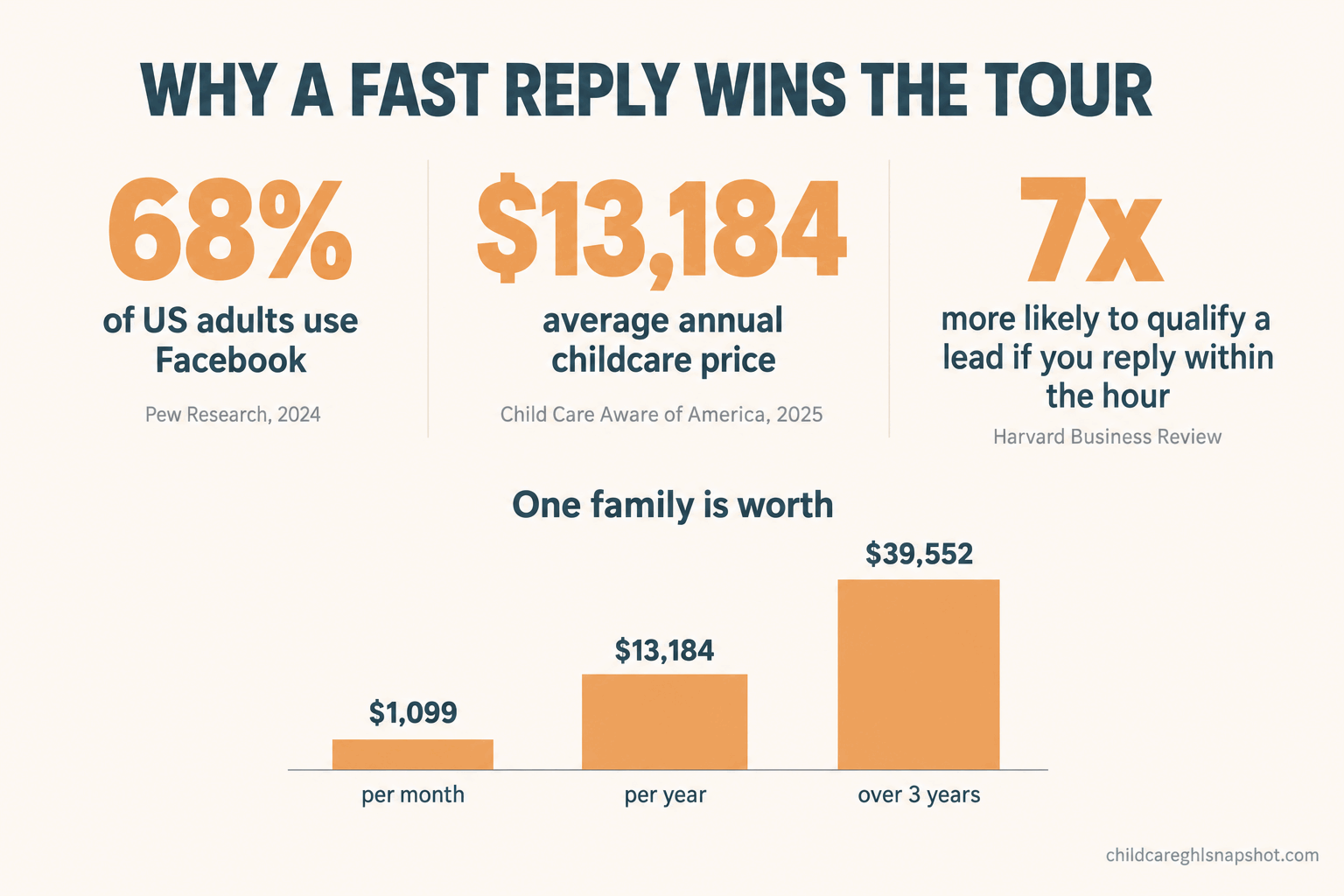
About 68% of US adults use Facebook, and usage runs higher among women at 76%, per Pew Research Center. The parents researching your center live on Facebook and Instagram. When they are ready, they do not fill out a form, they tap “Message.” That is not a casual comment. It is a parent with a wallet open, messaging the two centers down the road at the same time.
Share of US adults who use each platform, per the Pew Research Center, February 2024. The parents shopping for care live on these channels.
Now the money. The national average price of child care in 2025 was $13,184 a year, per Child Care Aware of America, roughly $1,099 a month, so a family that enrolls an infant and stays three years is worth close to $40,000 before siblings and referrals. Demand is not the problem: 46% of children under 6 still lived in a licensed child care desert in 2025, per the Center for American Progress. The leak is the gap between a parent messaging you and you getting back to her while she still cares. That is the money inside a message you ignored until Tuesday.
The speed part is not a guess. Harvard Business Review’s study of online sales leads found firms that reached out within an hour were about 7 times more likely to have a qualifying conversation than firms that waited one hour longer, and 60 times more likely than those that waited a day. A daycare inquiry has an even shorter shelf life, because a nervous parent wants reassurance now. It is the same problem behind why daycares lose enrollments to whoever calls back first, now in your inbox.
The six stages, start to booked tour
The system has six stages, each handing off to the next automatically. A parent messages, gets an instant reply, answers three quick questions, picks a tour time from a link, gets reminders, and shows up. If she is not ready yet, she drops into a gentle follow-up instead of off a cliff. You set it up once, then it runs without you.
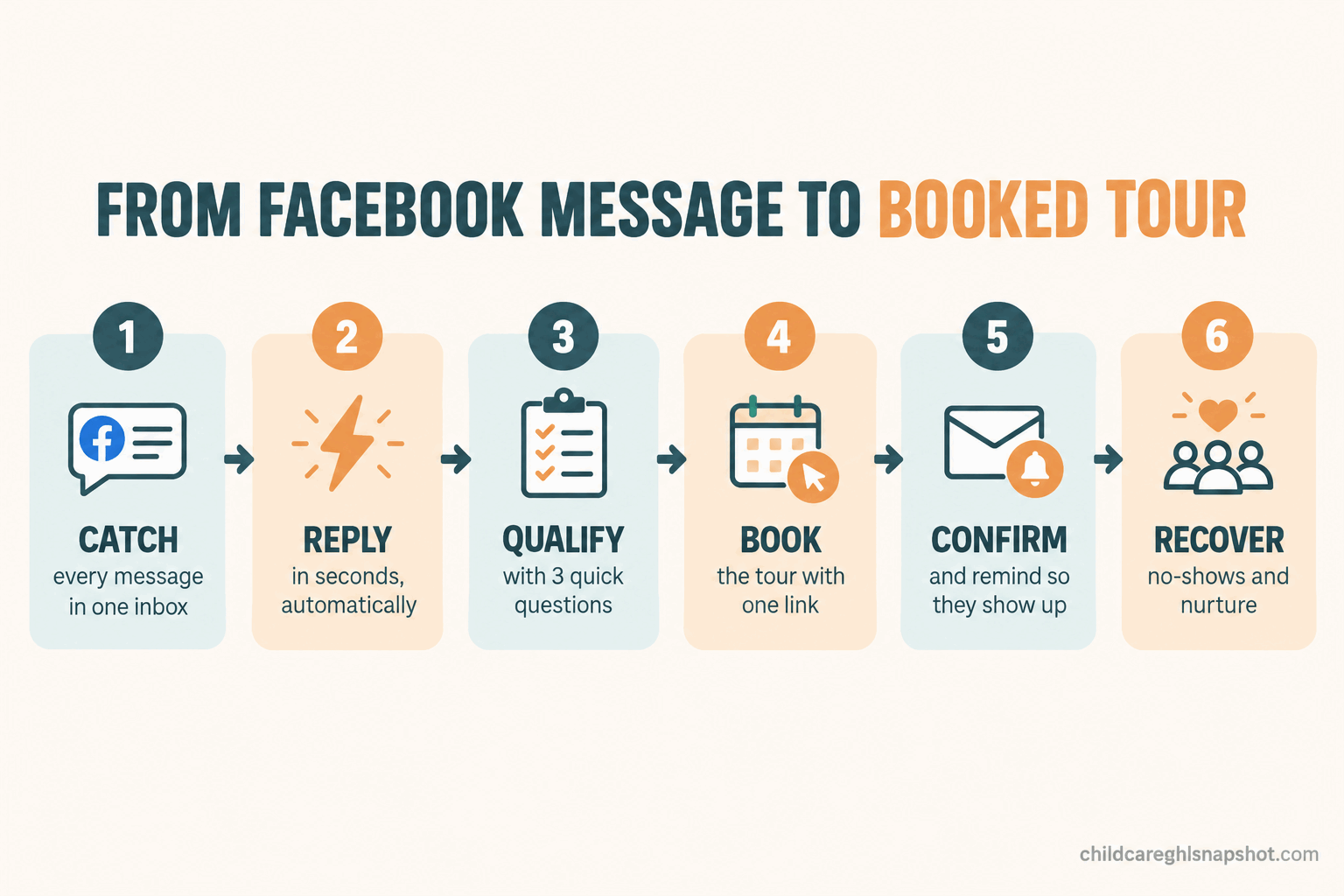
Stage 1: Catch every message in one place
Right now your inquiries are scattered across your Facebook page, Instagram, a website chat box, a Google Business profile, and voicemail. Nobody can watch five inboxes while running a classroom, so messages rot in the one nobody checked today. Stage one is boring and it matters most: route every channel into one shared inbox, with texts and calls alongside them, so a message cannot hide. When one lands anywhere, the clock starts and the next stage fires.
How this breaks: The classic failure is a personal Facebook account tangled up with the business Page, so messages land where the system cannot see them. Sort out Page roles first. The second is leaving Instagram out because “nobody messages us there,” then missing the one mom who did. Connect every channel, because the quiet one hides the uncontested lead.
Stage 2: Reply in seconds, automatically
The instant a message arrives, an automatic reply goes out. Not a cold “Thanks, we will respond within 48 hours,” which reads like a brush-off. A warm note in your voice: we are so glad you reached out, yes we have openings to talk about, one quick question to point you right. It buys you time and tells a nervous parent that a real place with its act together is on the other end, exactly when you cannot answer: nights, weekends, nap time. You are not pretending a human replied, you are holding her attention until one can take over.
How this breaks: Two ways. First, a robotic or salesy auto-reply does more harm than silence, so write it like a person and read it aloud before shipping. Second, Facebook and Instagram give you a 24-hour standard messaging window to respond to a user, so a follow-up 30 hours later can be blocked. Do the real work inside that first day, and use allowed message tags for slower follow-ups.
Stage 3: Ask the three questions that qualify
Not every message is a ready-to-enroll family, and you do not want to burn a tour slot on someone who needs care in a city you are not in. So the auto-reply ends with a little qualifying, done conversationally, never like a form. Three questions cover it: how old is your child (or when are you due), when do you need to start, and which program or days. Keep it to three, because a parent texting one-handed will answer three quick questions and abandon a ten-field form.
How this breaks: Asking too much, too soon. The moment it feels like an intake packet, she is gone. Ask the three, book the tour, and collect the rest at or after the visit. The other failure is doing nothing with the answers, so a family who needs infant care gets offered a preschool tour. Route the answers to the right program, or the qualifying was theater.
Stage 4: Offer the tour as a link, not a phone-tag loop
Here is where most centers lose the booked tour even after a great chat. The director writes “Great! When works for you?” and the back-and-forth begins: she suggests Thursday, you are closed for a staff day, you suggest Friday, she is at work, three days pass, and she never books. You did everything right and lost her to scheduling friction.
Replace all of that with one link that shows your real tour availability and lets her pick a slot that drops straight onto your calendar. No phone tag. A parent who is hot right now can book in fifteen seconds. This is the same booking engine behind cutting tour no-shows without nagging parents, here doing the booking itself.
How this breaks: A calendar with no limits, so you get a tour booked at 4:55pm during pickup chaos or three stacked in one morning with nobody to cover the floor. Set your tour windows to times a director can actually give a good tour, and cap how many per day. The other failure is hiding the link behind another step. Put it right in the conversation, the moment she is qualified.
Stage 5: Confirm and remind so they actually show
A booked tour is not a completed tour. Between booking and the visit, she forgets, a nap runs long, or she gets cold feet. So the moment she books, an automatic confirmation goes out with the day, the time, your address and a map link, who she will meet, and what to bring. Then a reminder the day before and another the morning of, each easy to reschedule from rather than silently skip. Add one touch that is pure daycare: a photo of the actual room she will see. A parent who can picture the space is far more likely to walk in, and to walk in half-sold.
How this breaks: Over-texting. Three reminders in a day reads as desperate and trains her to mute you. One confirmation, one day-before, one morning-of is plenty. And make rescheduling one tap, because a parent who cannot easily move a tour just no-shows it, when you could have had a reschedule.
Stage 6: Catch the no-show and the not-ready-yet
Two kinds of families slip through even a good funnel, and the system has to catch both.
The no-show booked and did not come. Old way, she joins the list of people you mean to call and never do. Instead, a same-day message goes out (“We missed you today, totally understand, want to grab another time?”) with the booking link. A surprising share rebook when the door is held open gently instead of slammed. This is the recovery half of winning back parents who go quiet after a tour, before the tour even happens.
The not-ready-yet messaged in October but does not need care until September, or needs something now when your only opening is six weeks out. Drop her and you lose her to whoever stays in touch. Instead she goes into a light nurture: a check-in every few weeks and a note the moment a relevant spot opens. That is a waitlist that turns into enrolled families instead of a dead list of names.
How this breaks: Treating a no-show as a rejection. She is not a no, she is a not-today, and one warm rebook message often recovers her. The other failure is nurturing everyone with the same generic blast. Segment by when she actually needs care, or it becomes noise.
Steal these: the messages that do the work
The system is only as good as the words in it. Copy these, then rewrite them in your own voice, because a message that sounds like your center beats a polished one.
The instant auto-reply (fires the second she messages):
Hi! Thanks so much for reaching out to Sunrise Learning. So I can point you to the right program and openings, can you tell me how old your child is (or your due date), and roughly when you’d want to start?
The qualifying follow-up (after she answers):
Perfect, thank you! We have openings coming up for that age. Want to come see the room and meet the teachers? Grab a tour time that works for you right here: [booking link]. Takes about 30 seconds.
The tour confirmation (the second she books):
You’re all set for [day] at [time]! We’re at [address, map link], and you’ll meet Miss Dana, who runs our infant room. Here’s a peek at the space: [photo]. Just park out front and ring the bell. See you soon!
The no-show rebook (same day):
Hi [first name], we had you down for a tour today and missed you. Totally understand, days with little ones rarely go to plan. Want to grab another time? Here you go: [booking link].
Wired to fire on a message, a booking, a no-show, and a date, these run without anyone watching an inbox. For the texts, get consent and register your number, per the compliance section.
Run it three ways
The same six stages fit a one-room center and a three-site group. What changes is who takes the human handoff and where the risk sits.
Solo operator, one site, 30 to 50 children. You are the director, the tour guide, and the floater, so automation is the only way the 9pm message gets answered at all. Let the system own everything through the booking link, and keep one job for yourself: show up, give a great tour, and answer the replies that need a human.
Mid-size, one or two sites, 60 to 100 children. You probably have an office lead who owns the inbox by day. The system covers the nights, weekends, and sick days, so a lead never sits unanswered for 14 hours. Automate the catch, the reply, and the booking, then route the handoff to that lead with a “respond within the hour” standard.
Multi-site, three or more locations. Your risk is inconsistency. Site A answers in two minutes, Site C answers in two days, and you cannot see it until a report shows one site starving. Standardize the funnel so every location runs the same reply, qualifying, and booking flow, route each parent to the right site’s calendar, and centralize reporting so you see response time and booked-tour rate by site. The math on what an empty classroom costs makes closing that gap the fastest money you will find.
The compliance part you cannot skip
This system runs on messages to parents, some of it automated, so run it inside the rules. Four things matter.
First, the platform rules. Facebook and Instagram give you a 24-hour standard messaging window to respond to someone who messages you, and your sequence must do its real work inside it. After 24 hours, Meta allows specific message tags, including a Human Agent tag that permits a reply within seven days. Meta also recommends disclosing that a chat is automated, so have your bot say it is a bot.
Second, text. If you move the conversation off the platform, the TCPA governs automated messaging, with statutory damages of $500 per violating message and up to $1,500 for a willful violation. Texting a parent who just asked about openings and gave you her number is low-risk, but get consent and keep it about her tour.
Third, A2P 10DLC. To text from a normal 10-digit business number in the US, you must register through your provider and The Campaign Registry, or carriers filter your messages and your reminders reach nobody. The full walkthrough is in the 2026 guide to texting daycare parents legally.
Fourth, photos and child records. If a confirmation shows a photo, use the room or a general classroom scene, never another family’s specific child without written consent on file. Anything touching a current child’s attendance or health stays in a parent-only channel, never a marketing list.
Objections I hear from directors
“Won’t an automated reply feel fake and turn parents off?” It feels far better than silence, which is what she gets now. The automation handles timing and the handoff, not the warmth. You write the words once, in your own voice, and a parent who gets a friendly reply at 9pm thinks “this place is on it,” not “this is a robot.” The alternative is not a human reply. It is Tuesday.
“I already pay for Brightwheel or Procare.” Those tools run the center after a family is enrolled: check-in, billing, daily reports. They are not built to catch a stranger’s Facebook message on a Sunday and book her a tour, and most charge per child on top. This layer sits before them, feeding enrolled families into whatever you use to run the day. I broke down what childcare software actually costs in 2026.
“Do I need to be technical to run this?” No. The connections and the sequence get set up once, by you or for you, and after that you answer replies and give tours, which you already do. And if you think you “barely get messages,” part of the reason may be that parents learned you do not answer and stopped.
Your questions, answered
How do I respond to Facebook messages for my daycare automatically?
Connect your Facebook Page, Instagram, and website chat into one shared inbox, then set an automated first reply, in your center's voice, that fires the instant a parent messages, asks two or three qualifying questions, and hands off to a human. Meta allows automated replies within a 24-hour window and recommends telling people they are chatting with a bot.
Why am I losing daycare leads from Facebook and Instagram?
Almost always response time. Parents message several centers at once, usually at night, and whoever replies first and offers a tour tends to win. Harvard Business Review found firms that respond within an hour are about 7 times more likely to have a qualifying conversation than those that wait an hour longer.
What is the best way to book daycare tours from a social media message?
Send a self-scheduling link that shows your real availability, so the parent picks a slot that drops onto your calendar in seconds. That beats suggesting times back and forth, which cools the lead. Pair it with an automatic confirmation and reminders so the tours actually show up.
Do I need to answer messages within 24 hours on Facebook?
Meta gives businesses a 24-hour standard messaging window to respond to someone who messaged your Page. After that you can only message using approved tags, such as the Human Agent tag, which allows a reply within seven days. You want to reply in minutes because speed wins the tour, but 24 hours is the technical limit.
Is it legal to send automated texts to parents who message my daycare?
Done right, yes. A text to a parent who just asked about openings and gave you her number, about her inquiry and her tour, is low-risk under the TCPA if you collect clear consent. You must also register your number for A2P 10DLC through your provider and The Campaign Registry, or US carriers filter your texts.
So picture that Sunday night again. Same tired mom, same message at 9:14pm. Only this time her phone buzzes back within a minute with a warm note asking her child’s age and start date. She answers one-handed, taps a link, and books a Tuesday tour before she puts the phone down. Tuesday morning she is standing in your lobby, already half-sold. You did not lose her to the center that answered first. You were the center that answered first.